一个基于 AI 的 Houdini 智能助手。自主 Agent 循环读取节点网络、创建与连接节点、编写 VEX、执行 Python;并集成 Meshy AI 3D 生成 —— 一句话从概念图到带贴图的 3D 资产,直接落进你的节点网络。 An AI assistant for Houdini. An autonomous agent loop reads your network, creates and wires nodes, writes VEX, runs Python — now with Meshy AI 3D generation: from a sentence to textured 3D assets, dropped straight into your node graph.
50+ 工具 · 文生/图生 3D · 角色绑定与动画 · 概念图画廊 · 图生图二次编辑(可选生图模型)· 云资产库 · 一键直达 Meshy · 后台任务 · 六大 AI 提供商 · Plan 模式 · 长期记忆 · 全新 QML 界面 · 中英双语。独立程序自带运行环境,自动桥接到 Houdini。 50+ tools · text/image-to-3D · character rigging & animation · concept galleries · image-to-image editing (choose your image model) · cloud asset library · one-click Meshy access · background tasks · six AI providers · Plan mode · long-term memory · new QML UI · bilingual. A standalone app with its own runtime, auto-bridged to Houdini.
// 抬升曲面,制造山脉起伏
float amp  = 2.5;
float freq = 0.35;
float n = noise(@P * freq);
@P.y += n * amp;
@Cd  = set(n, n*0.6, 1.0-n);
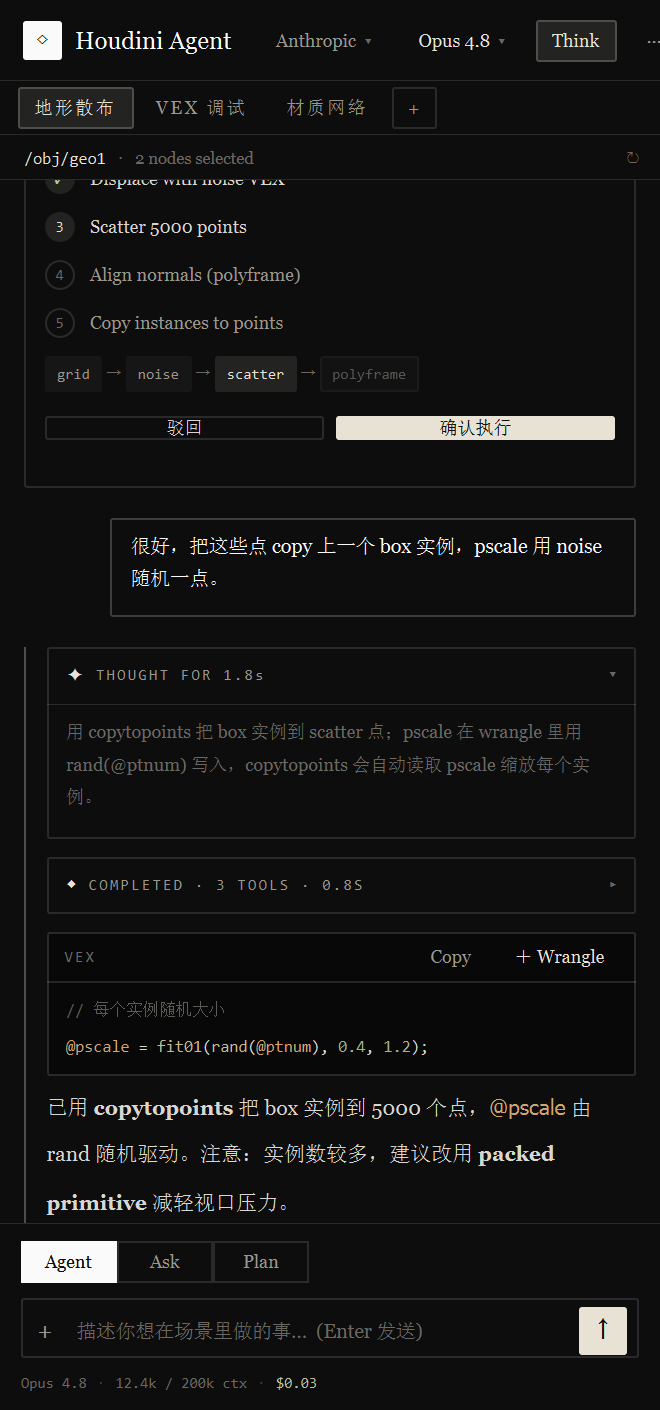
已搭好 grid → mountain_vex → scatter 链路。noise 通过 VEX 抬升 @P.y,scatter 输出 5000 点。需要我把点 copy 上实例几何吗?Built the grid → mountain_vex → scatter chain. Noise displaces @P.y via VEX; scatter outputs 5000 points. Want me to copy instances onto them?
基于 OpenAI Function Calling 协议,Agent 自主规划、调用工具、检查结果、继续迭代,直到任务真正完成。 Built on the OpenAI Function Calling protocol, the agent plans, calls tools, inspects results, and keeps iterating until the task is truly done.
接收请求 → 规划 → 调用工具 → 检查结果 → 继续,直到完成。多轮工具调用由 AI 自主决定顺序。Request to plan to tools to inspection to continue — multi-turn tool calls, ordered by the AI itself, until finished.
优先创建 Wrangle 写 VEX;可在 Houdini Python Shell 运行 hou 代码,或执行系统 Shell 命令(带超时与安全保护)。Writes VEX in wrangles, runs hou code in Houdini's Python shell, or executes system shell commands — with timeouts and safety guards.
三层记忆系统 — 事件记忆、抽象知识、策略记忆,奖励驱动学习与自动反思。可全局开关。A three-tier system — episodic, abstract, and strategic memory — with reward-driven learning and auto-reflection. Globally toggleable.
为视觉模型附加图片,支持粘贴、拖拽、文件选择与缩略图预览。可截取 3D 视口直接喂给模型。Attach images for vision models — paste, drag-drop, file picker, thumbnails. Capture the 3D viewport straight into the model.
通过 plugins/ 目录扩展 Hook 事件、自定义工具与 UI。类似 Cursor Rules 的持久上下文规则,自动注入每次请求。Extend hooks, custom tools and UI via plugins/. Cursor-style persistent rules inject context into every request.
可点击节点路径、实时上下文栏、Token 分析、流式 VEX 预览、多会话标签页、中英双语动态重译。Clickable node paths, live context bar, token analytics, streaming VEX preview, multi-session tabs, dynamic bilingual retranslation.
完整权限。可用全部 40+ 工具 — 创建、修改、连接、删除节点,设置参数,执行脚本,保存场景。Full access. All 40+ tools — create, edit, connect, delete nodes, set parameters, run scripts, save the scene.
只读。仅查询场景结构、检查参数、搜索文档与分析;修改类工具被模式守卫拦截。Read-only. Query structure, inspect params, search docs, analyze — write tools are blocked by the mode guard.
先调研、再澄清,生成带 DAG 流程图的结构化计划,用户确认后执行。内置自动续接防止过早终止。Research, clarify, then produce a structured plan with a DAG. Executes only after you confirm — with auto-continue against early stops.
深度集成 Meshy AI 3D 生成。文生 3D、图生 3D、概念图画廊、图生图二次编辑、云资产库 —— 全部作为 Agent 的工具,由它在对话里自主编排,产物直接落进你的节点网络。 Deeply integrated Meshy AI 3D generation — text-to-3D, image-to-3D, concept galleries, image-to-image editing and a cloud asset library. All exposed as agent tools, orchestrated in conversation, with results landing straight in your node graph.
还没有 Meshy?前往 Meshy 注册并获取 API Key ↗ No Meshy account yet? Sign up at Meshy and get an API key ↗
一句描述或一张参考图,生成带 PBR 贴图的 3D 模型,自动下载 glb 与贴图并导入 /obj。A description or a reference image becomes a PBR-textured 3D model — glb and maps auto-downloaded and imported to /obj.
并行生成多张概念图,画廊里多选你要的几张,一键升级成 3D —— 不喜欢就换提示词重生,全程在一张卡片里。Generate several concepts in parallel, multi-select your favourites in the gallery, then upgrade to 3D in one click — or regenerate with a new prompt, all in one card.
上传图片说"在这基础上改",或选中概念图加提示词做局部编辑。反馈交给 Agent,由它改写提示词再生成 —— 不是把你的原话直接喂给 API。Upload an image and say "edit from this", or pick a concept and add a prompt for a local edit. The feedback goes to the agent, which rewrites the prompt before regenerating — not your raw text straight to the API.
侧滑抽屉式资产库,连接 Meshy 账号同步余额与云端历史模型,缩略图实时更新,一键拉进 Houdini —— 已缓存的零网络复用。A slide-out asset drawer connects your Meshy account, syncs balance and cloud history, updates thumbnails live, and pulls models into Houdini in one click — cached assets reuse with zero network.
生成耗时较久?一键转入后台,Agent 继续干别的,任务完成后结果自动回报给它;还有工具让 Agent 随时查询进度。Long generations? Send them to the background — the agent keeps working, results auto-report back on completion, and a tool lets it query progress anytime.
为已有模型重打材质、四边面重拓扑;import_3d_asset 带贴图导入,export_node_to_glb 把节点导出回 Meshy 再加工。Retexture existing models, remesh to clean quads; import_3d_asset brings in textures, export_node_to_glb sends nodes back to Meshy for another pass.
统一的 ToolRegistry 集中管理核心工具、技能脚本与插件工具,支持基于模式的访问控制。A unified ToolRegistry manages core tools, skill scripts and plugin tools, with mode-based access control.
Skill 是预优化的 Python 脚本,在 Houdini 内运行做可靠的几何分析 —— 涉及分析时 Agent 优先调用 Skill 而非手写代码,也支持加载你自己的 Skill 目录。Skills are pre-optimized Python scripts that run inside Houdini for reliable geometry analysis — the agent prefers them over hand-written code, and you can load your own skill directory.
受大脑启发的三层长期记忆系统,让 Agent 跨会话越用越懂你的场景与偏好。A brain-inspired three-tier memory so the agent learns your scenes and preferences across sessions.
记录每次交互的具体操作、结果与上下文。Records each interaction's actions, results and context.
从事件中提炼可复用的规则与模式。Distills reusable rules and patterns from events.
沉淀"什么场景用什么解法"的高层策略。Builds high-level "which approach for which case" strategy.
外加奖励驱动学习与自动反思;search_memory 按类别、抽象层级与置信度检索相关经验。整套系统可一键全局开关,默认关闭、随时可开。Plus reward-driven learning and auto-reflection; search_memory retrieves by category, abstraction level and confidence. The whole system has a global toggle — off by default, on whenever you want.
不是套壳。底层为在 Houdini 里安全、可控地跑 Agent 做了大量工程。Not a thin wrapper — real engineering underneath to run an agent safely inside Houdini.
所有 hou.* 调用经 Qt 队列回主线程执行,绝不在子线程动场景,从根上杜绝崩溃。Every hou.* call is marshalled back to the Qt main thread — the scene is never touched off-thread.
ToolRegistry 在 Ask / Plan 模式下统一拦截改动类工具 —— 只读就是只读。ToolRegistry blocks mutating tools in Ask / Plan modes — read-only means read-only.
按轮次裁剪,永不截断用户/助手消息,只压缩工具结果,长对话也不溢出。Round-based trimming never truncates your messages — only tool results get compressed.
工具报错自动诊断与重试,引导 Agent 走通而非卡死。Tool errors are diagnosed and retried, steering the agent through instead of stalling.
实时用量、推理 Token、缓存命中率与按模型估算的费用。Live usage, reasoning tokens, cache-hit rate and per-model cost estimates.
检测 AI 过早终止,注入续接消息强制跑完所有计划步骤。Detects early stops and forces the plan to run every step to completion.
云端、中转、本地、自定义端点 — 一个面板里随时切换提供商与模型。Cloud, relay, local, custom endpoints — switch provider and model from one panel.
deepseek-v4-flashdeepseek-v4-prodeepseek-v4-flash-vision-expglm-4.7gpt-5.6-solgpt-5.6-terragpt-5.5LM StudiovLLMself-hostedclaude-opus-5gpt-5.6-solglm-5.3claude-opus-5gpt-5.6-solgrok-4.6主面板是真实截图,其余几块用同一套组件实时渲染 —— 不是图片,任意缩放都清晰。The main panel is a real screenshot; the rest are live-rendered from the same components — not images, crisp at any scale.
// 抬升曲面
float n = noise(@P * 0.35);
@P.y += n * 2.5独立程序,自带运行环境 —— 无需安装 Python,也无需 pip。下载、运行、自动连上 Houdini。A standalone app with its own runtime — no Python install, no pip. Download, run, and it connects to Houdini for you.
下载一个安装程序,运行后选择安装目录、可勾选添加桌面快捷方式。装好后双击桌面图标即可打开 —— 自带运行环境,无需 Python。Download one installer, pick an install folder, optionally add a desktop shortcut. Then just double-click the desktop icon — its own runtime, no Python.
程序自动探测 Houdini(20.5+)并装好桥接 package,点「打开 Houdini」即可 —— 启动后自动经 Bridge 连接。It auto-detects Houdini (20.5+), installs the bridge package, and offers "Open Houdini" — then connects over the bridge automatically.
在程序内点「API Key…」保存到本机,或设置环境变量。想用 AI 3D 生成?再填一个 Meshy API Key 即可。Click "API Key…" in-app to save locally, or set an environment variable. Want AI 3D generation? Add a Meshy API key too.
# 独立程序(自带运行环境)
Houdini Agent.exe  → 探测 Houdini → 装桥接 package → 打开 Houdini
        │  bridge client
        ▼
Houdini  (启动时自动起 bridge server)  # hou.* 调用回主线程执行# standalone app (self-contained runtime)
Houdini Agent.exe  → detect Houdini → install bridge pkg → open Houdini
        │  bridge client
        ▼
Houdini (bridge server auto-starts on launch) # hou.* runs on the main threadimport sys
sys.path.insert(0, r"C:\path\to\Houdini-Agent")
import launcher
launcher.show_tool() # 在 Houdini 内自动跑内嵌界面# DeepSeek
[Environment]::SetEnvironmentVariable('DEEPSEEK_API_KEY', 'sk-xxx', 'User')
# OpenAI
[Environment]::SetEnvironmentVariable('OPENAI_API_KEY', 'sk-xxx', 'User')
# OpenRouter
[Environment]::SetEnvironmentVariable('OPENROUTER_API_KEY', 'sk-or-xxx', 'User')真实交互示例 — 从一句话到一整套节点网络。Real interactions — from a sentence to a full node network.
box1 → scatter1 → copytopoints1,球体模板半径 0.05,500 个点。Done. Built box1 → scatter1 → copytopoints1, template sphere radius 0.05, 500 points.@Cd = set(rand(@ptnum), rand(@ptnum*13.37), rand(@ptnum*7.13));attribwrangle1,为所有点设置随机 Cd 属性。Created attribwrangle1, setting a random Cd on every point.P、N、Cd、pscale、id。5 point attributes: P, N, Cd, pscale, id./obj/axe_01,含 base color / normal / roughness 贴图。消耗 5 credits。Generated and imported /obj/axe_01 with base color / normal / roughness maps. 5 credits used.…domed lid, rounded top… 后重生,得到圆顶版本。要把它升级成 3D 吗?Edited from your selected concept — I rewrote the prompt to …domed lid, rounded top… before regenerating. Upgrade it to 3D?当前版本 v2.0.15。一个拥有 50+ 工具、能生成并绑定 / 动画 3D 角色的自主 Agent。Currently v2.0.15. An autonomous agent with 50+ tools that generates, rigs and animates 3D characters.
MESHY_API_KEY)即可。之后直接对 Agent 说"生成一个…的 3D 模型",它会自主调用文生 / 图生 3D、概念图画廊等工具,产物自动导入 /obj。云资产库会同步你 Meshy 账号下的余额与历史模型。Key 只存在本机,绝不明文上传。Add your Meshy API key in the toolbar (or set MESHY_API_KEY). Then just tell the agent "generate a 3D model of…" — it autonomously calls text/image-to-3D, the concept gallery and more, importing results into /obj. The cloud library syncs your account's balance and history. The key stays on your machine and is never uploaded in plaintext./obj/geo1/box1);并查看工具结果中的具体错误信息。Make sure Houdini is running and the app shows "connected" (bridge is up); use absolute node paths like /obj/geo1/box1; and read the error in the tool result.config/、cache/、trainData/、plugins/、rules/ 目录。Click Update in the toolbar; the plugin also checks GitHub at startup and shows a banner. Updates preserve your config/, cache/, trainData/, plugins/ and rules/ directories.免费、开源。下载独立程序,自动连接 Houdini —— 无需配置 Python。建网、写 VEX、生成 3D 资产,全在一句话之间。Free and open source. Download the standalone app — it connects to Houdini, no Python setup. Build networks, write VEX, generate 3D assets — all a sentence away.
 Meshy
Meshy